What is Tidewave?
Tidewave is an AI coding assisstant meant for full stack web development. It is built on top of Elixir and Phoenix by José Valim. What I found different about Tidewave is that it runs insdie of your browser. It is deeply integrated with your web frameworkand easily allows you to see what the coding agent is doing in real time.
Getting Started with Tidewave
Prerequisites
Before we begin, make sure you have:
- Elixir / Pheonix or Ruby on Rails
- Development environment access (Tidewave runs alongside your app during development)
- An AI Provider Key (OpenAI, Anthropic, etc.)
- Basic knowledge of web development
Setting Up the Project
Once you have your project created you will need to include Tidewave in your dependencies.
# In the mix.exs file
{:tidewave, "~> 0.5", only: :dev}

#Get the dependencies
mix deps.get
Then you will need to plug Tidewave into your endpoint. Place this right above the code_reloading? block.
# In the endpoint.ex file
if Code.ensure_loaded?(Tidewave) do
  plug Tidewave
end
Now you should be set to run the Pheonix server and go to localhost:4000/tidewave to see the interface.
Tidewave allows users to have 10 free prompts from their paid plan, so you can try it out before committing. This is a great way to get a feel for the in-browser coding assistant and see how it integrates with your workflow.
However, once those free prompts are used up, you’ll need to purchase a plan on the Tidewave website to continue using it. Tidewave doesn’t bundle its own model access so you will need to add your own AI provider key. For example, when I tested Tidewave, I used an Anthropic API key from Claude Code. After adding my key, Tidewave immediately connected and I was able to use the assistant directly inside my Phoenix app’s browser session. You can do the same with other supported providers like OpenAI or GitHub Copilot depending on your preference.
Vibe Coding
My Goal
I wanted to see how Tidewave would handle building a complete task manager app from scratch with only prompts from me and no manual intervention. I decided to build a task manager app because it is a simple app that can be built with a few prompts and it is a good way to test the capabilities of Tidewave, without the complexity of a larger app. What mainly interested me was to see it’s ability to write quality tests and create a professional and reactive interface.
The Promts I Used
I started by given claude one single prompt to get things rolling.
- Create an action plan for making a task manager webpage. There should be three sections. To Do, In Progress, and Finished. The tasks should be able to move from one section to another as needed. The name of this will be Tide Tasks.
After that everything else was done inside of the browser using Tidewave.
- Start by completing phase one of the action plan
- Now do phase 2 and test the functionality
- I see that the page isn’t filling up the entire screen and the layout is done in rows instead of columns can you fix that.
- Do you see how this isn’t taking up the whole webpage space. I want it to do that. Also the three columns extend past this. (I used the Tidewave feature that allows you to select specific elements of the page to point the assistant to the right element)
- The create task shouldn’t be in To Do but placed above the three columns and centered
- Do phase 4
That’s all it took besides a few extra prompts I used for color theme and other minor UI changes, such as a toggle for important tasks.
The Action Plan
Tide Tasks - Action Plan
Phase 1: Foundation
- Set up basic HTML structure - Create the main webpage framework
- Create three main sections - Build To Do, In Progress, and Finished columns
- Style with CSS - Apply modern, clean design with proper spacing and colors
Phase 2: Core Functionality
- Task creation - Add input form to create new tasks (default to To Do section)
- Drag-and-drop movement - Enable tasks to move between sections seamlessly
- Task editing - Allow users to rename/modify existing tasks
Phase 3: Enhanced Features
- Task deletion - Add delete functionality with confirmation prompts
- Local storage - Persist tasks so they remain after browser refresh
- Responsive design - Ensure mobile and tablet compatibility
Phase 4: Testing & Polish
- Comprehensive testing - Test all features and fix any bugs
The Results
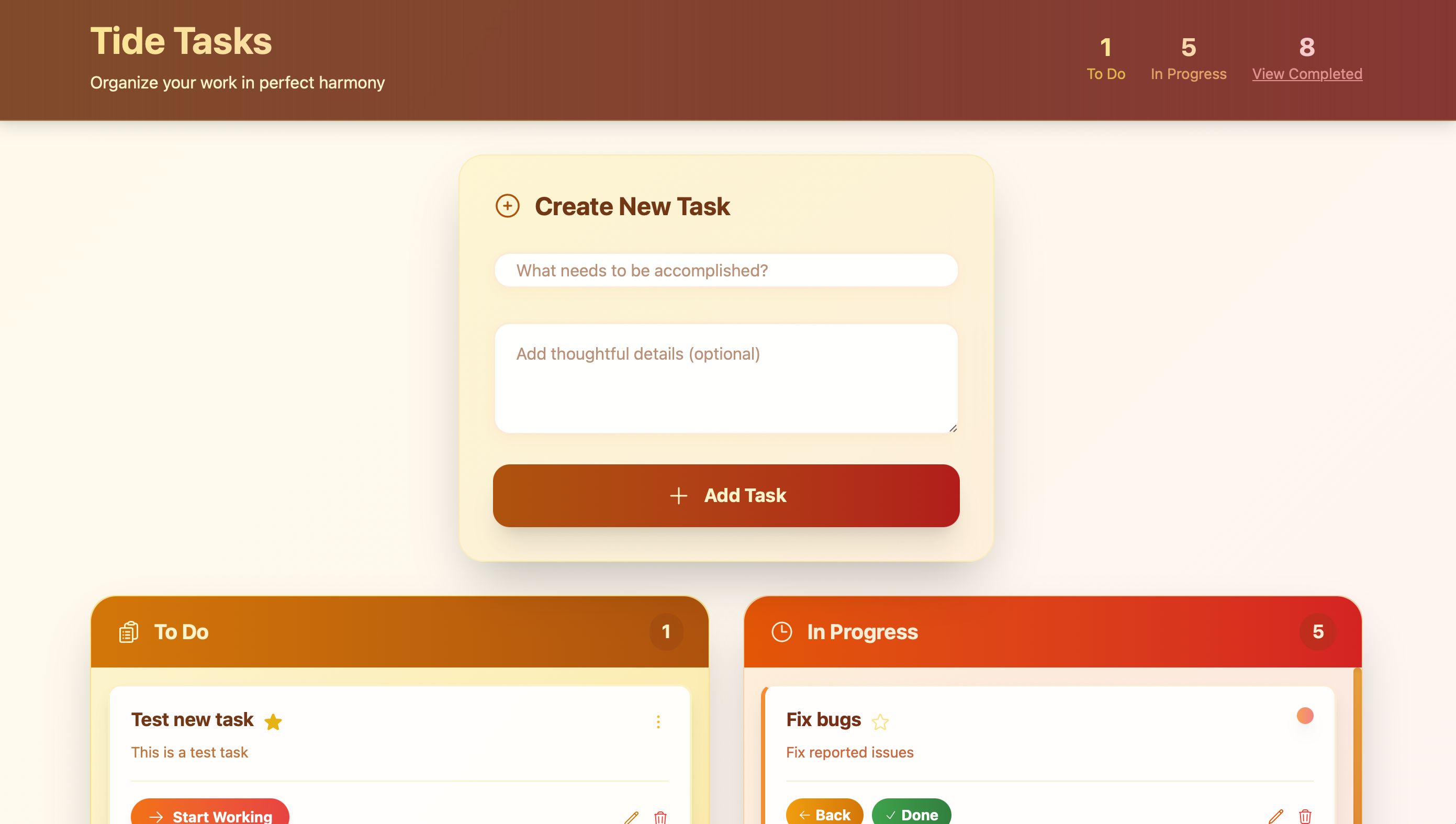
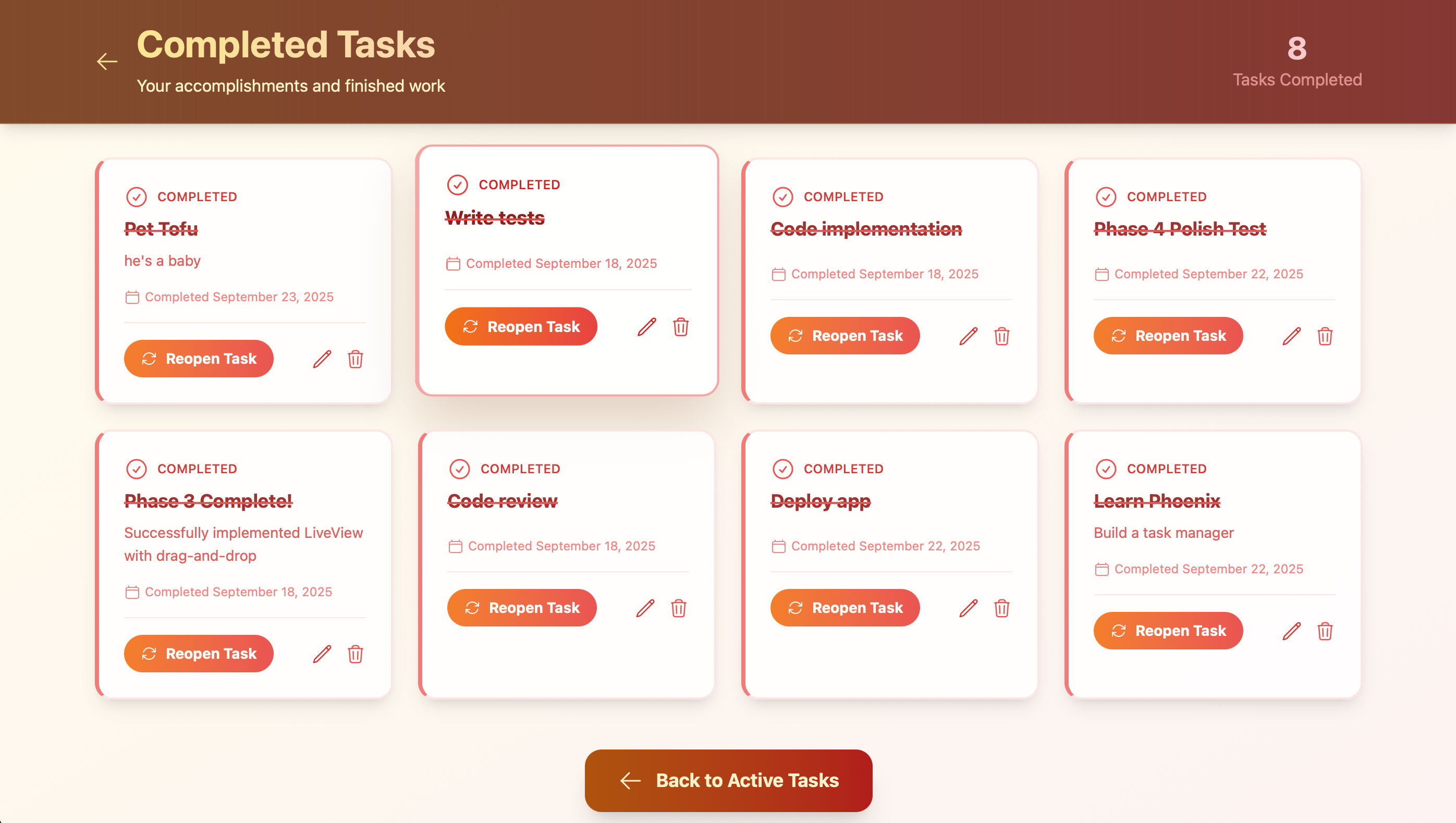
What Went Well
The time. Tidewave was able to complete the task manager app in less than 30 minutes. The app was also able to handle all the features I asked forThe UI was also very professional and reactive. Although I believe given the time a professional would be able to create a better design. I was impressed by the troubleshooting skills of Tidewave. If it ran into an issue and broke the website it was able to diagnose the issue and fix it. With every phase this happned, but it was able to fix it every time without more instruction. Completing the app didn’t burn through my Anthropic credits as fast I expected. I only used $3 worth of credits.
What Could Have Been Better
Overall I’m satisfied with the results, but there was still things that could have been better. The quality of the tests that Tidewave wrote were not as good as I hoped. I believe that it would write tests with the goal of them passing and not the goal of testing the behaviour of the app. As a final prompt for this experiment I asked Claude to review the tests, to make sure they were truly functioning as tests and to improve them. There were tests that were solid and others that were not, which Claude was able to improve.
Conclusion
This experiment was a success in my eyes. Tidewave built the task manager app quickly and with a level of quality that was more than acceptable for a first pass. From a developer’s perspective, tools like Tidewave and AI coding assistants in general show real potential for speeding up development.
I wouldn’t rely on them exclusively just yet. I still have concerns about the accuracy of generated tests and the long term maintainability of the code. I believe AI is best used as an way to move faster on prototypes, while a developer applies their judgement to review and refine the output.
Overall, I’m excited about what’s possible. This feels like the beginning of a shift in how we build software, and I’m looking forward to seeing how AI coding assistants evolve in the coming years.
Check Out Tidewave
- Tidewave: https://tidewave.ai