Released v1.0.0 of spring-boot-guide, a Claude Code plugin for modern Spring Boot. Ten skills, thirty-nine rules wired into native hooks, three read-only review agents, and a mutation gate that fails the build when a rule stops enforcing anything. Then I built a real Spring Boot 4.1 backend under it, inside the same showcase repo that validated the Angular plugin, to see what the rules caught.
Released v1.0.0 of angular-guide, a Claude Code plugin for modern Angular. Nine skills, thirty rules wired into native hooks, and three read-only review agents. Then I built a real app under it to see what the rules actually caught.
A plugin update for stride-security-review shipped today, so I ran it against Trays Social without changing a line of application code. Then I ran it again. Same plugin version, same files, different counts and, more importantly, different reads on whether there was a Critical at all.
Run 1 (single-pass): 44 findings, 0 Critical, 2 High.
Run 2 (single-pass): 40 findings, 1 Critical, 2 High.
Run 3 (--rci 2): 33 findings, 1 Critical, 3 High.
--rci 2 adds two extra critique passes (the flag is clamped to a max of 3). After that the picture settled.
I pointed the stride-security-review Claude Code plugin at Trays Social and let it walk the whole repo. 289 files across the Phoenix backend, the iOS client, the Dockerfile, the Fly workflow, and Ecto migrations. It batched the scan into 29 chunks and merged the results.
The Elixir Phoenix Guide is now available for GitHub Copilot. Everything from the Claude Code version, ported into Copilot’s native instruction and hook system. Nothing was cut.
Released v2.3.0 of my Elixir Phoenix Guide plugin. This release pushes beyond core LiveView and Ecto into five additional Phoenix development domains: security, deployment, channels, telemetry, and JSON APIs. Six new hooks enforce security rules as you write, blocking dangerous patterns before they reach a commit.
Released v2.2.0 of my Elixir Phoenix Guide plugin. The big change: hooks are now context-aware. They detect your project stack at the start of a session and adjust their behavior accordingly. Four new validation hooks bring the total to 21, and every warning now includes a fix you can copy and paste.
Released v2.1.0 of my Elixir Phoenix Guide plugin. Six new skills bring the total to 14. One new hook brings it to 15. The plugin now covers the full Phoenix development lifecycle, from authentication through data patterns to deployment safety.
In OOP, the answer is always: in a class. Classes are the organizing unit for everything. They hold state, define behavior, inherit from parent classes, and form hierarchies that model relationships between concepts.
In Elixir, the organizing unit is the module. Modules hold functions. That’s it. They don’t hold state, they don’t inherit from other modules, and they don’t form hierarchies. This changes how you think about organizing code.
Released v2.0.0 of my Elixir Phoenix Guide plugin. This is a major version bump. The plugin now detects code quality issues automatically, not just through skills and hooks telling you what to do.
In Part Four, we introduced pattern matching and saw basic guards in function clauses. We wrote things like when age < 13 and moved on. This post picks up where that left off.
Guards and multi-clause functions are how you structure decision-making in Elixir. Where OOP reaches for if/else chains, switch statements, or the strategy pattern, Elixir uses function heads with guards. Once you’re comfortable with this approach, you’ll find that most conditional logic just becomes more functions.
Released v1.4.0 of my Elixir Phoenix Guide plugin. Two new skills, three new hooks, and a fix for something that’s been bugging me: subagents ignoring the rules.
The Problem with v1.3.x
The plugin had five skills covering Elixir core, LiveView, Ecto, uploads, and testing. That’s solid for web layer code. But two big gaps remained.
No OTP guidance. GenServer, Supervisor, Task, Agent, ETS. These are core to any real Elixir application, and the plugin had nothing to say about them. Claude Code would write GenServers with blocking handle_call callbacks, skip supervision trees, or reach for Agent when a simple GenServer would do.
In Part Six, we saw how the pipe operator turns nested function calls into readable pipelines. In Part Two, we learned that functions are values. You can pass them to Enum.map and Enum.filter to transform and select data.
Now we’ll go deeper. A higher-order function is a function that does at least one of these things:
Takes a function as an argument (like Enum.map)
Returns a function as its result
You’ve already used higher-order functions when calling Enum.map and Enum.filter. This post covers the most important one you haven’t seen yet, reduce, then gets into writing your own higher-order functions and composing functions together.
In Part Five, we saw how recursion replaces loops. Now let’s look at a different readability problem: nested function calls.
Say you need to take a user’s input, trim whitespace, convert it to lowercase, and capitalize the first letter. In Elixir, without the pipe operator, you’d write:
String.capitalize(String.downcase(String.trim(" HELLO WORLD ")))# "Hello world"
You have to read this from the inside out. The first operation (trim) is buried in the middle, and the last operation (capitalize) is on the outside. The more steps you add, the worse it gets.
If you’re coming from OOP, you might be used to method chaining, which reads left to right:
# Python - method chaining" HELLO WORLD ".strip().lower().capitalize()# "Hello world"
// JavaScript - method chaining
" HELLO WORLD ".trim().toLowerCase()// "hello world"
// (JavaScript doesn't have a direct capitalize method)
Method chaining reads nicely, but it only works because each method is attached to the object. In functional programming, functions aren’t bound to objects. They’re standalone. So how do we get the same readability?
v1.2.0 built out four skills that cover Elixir patterns, LiveView, Ecto, and file uploads. What I didn’t have was anything for tests. You could open a _test.exs file and the plugin had nothing to say. That felt like a hole worth fixing.
The Problem with v1.2.0
The four skills worked well for production code but testing was just not covered. Claude Code would write a context module following strict patterns, then write the tests with no real guidance. The result was inconsistent test setup, missing edge cases, and assertion styles that made failures hard to read.
In Part Four, we learned how pattern matching enables elegant data handling. Now we’ll tackle another fundamental shift: in functional programming, you don’t use loops - you use recursion.
If you’re coming from an object-oriented background, loops are probably second nature. for, while, forEach - these are the tools you reach for when you need to process multiple items. But in Elixir, immutability means you can’t have traditional loop counters that increment. Instead, you use recursion: functions that call themselves.
Once you understand recursion, you’ll find it more expressive than loops. It naturally handles complex iteration patterns, and Elixir’s tail-call optimization makes it just as efficient as loops in other languages.
In Part Three, we learned about pure functions and side effects. Now we’ll tackle one of the most distinctive features of functional programming: pattern matching.
Pattern matching is Elixir’s superpower for working with data. It’s not just a fancy way to assign variables - it’s a fundamentally different approach to extracting, validating, and routing data through your program. Once you understand pattern matching, you’ll find conditionals, type checking, and data extraction in OOP languages feel unnecessarily verbose.
Released v1.2.0 of my Elixir Phoenix Guide plugin. This is a major restructuring: eight separate skills consolidated into four essential modules, each with enforced rules and real-time validation.
This isn’t a minor update. It’s a complete rethinking of how Claude Code should guide Elixir/Phoenix development.
The Problem with v1.1.x
In v1.1.x, I had eight skills covering different aspects of Elixir and Phoenix development. The structure worked, but created problems:
In the first post, we explored immutability. In the second post, we saw how functions are values. Now we’ll tackle a concept that ties them together: pure functions.
Pure functions are the building blocks of functional programming. They’re predictable, testable, and easy to reason about. But real applications need side effects - saving to databases, making HTTP requests, printing to the console. The key is knowing how to write pure functions and where to isolate side effects.
In v1.0.0, Claude Code would often miss applicable skills. The “Use when” language wasn’t directive enough, and there was no systematic way to identify which skills applied to a task.
Result: Skills existed but weren’t being invoked consistently.
What Changed
New Skill Discovery System
Added a meta-skill called skill-discovery that provides a systematic checklist based on file types and task requirements. Think of it as a flowchart for skill selection.
In the first post, we explored how immutability changes the way we think about data. Now we’ll tackle another fundamental shift: in functional programming, functions are values just like numbers, strings, or lists. You can pass them as arguments, return them from other functions, store them in variables, and put them in data structures.
If you’re coming from object-oriented programming, you’ve probably encountered this concept through callbacks, lambdas, or method references. But in OOP, these often feel like workarounds or special cases. In functional programming languages like Elixir, treating functions as first-class citizens is natural and central to how you write code.
If you’re coming from an object-oriented programming background, one of the most fundamental shifts in thinking when learning functional programming is immutability. In Elixir and other functional languages, data never changes once it’s created. This might sound limiting at first, but it’s actually a superpower that unlocks predictability, thread safety, and easier debugging.
This is the first post in a series exploring functional programming concepts through Elixir, aimed at developers transitioning from OOP paradigms.
I’ve been using Claude Code for Elixir development and wondered: Does customizing the AI with skills, hooks, and agent documentation actually make a difference?
To find out, I built the same Phoenix LiveView image gallery application twice:
Build 1 (Baseline): Minimal configuration - just project guidelines and specs
Both builds used identical project specifications and the same base agent guidelines. The only difference was the additional plugin configuration in Build 2.
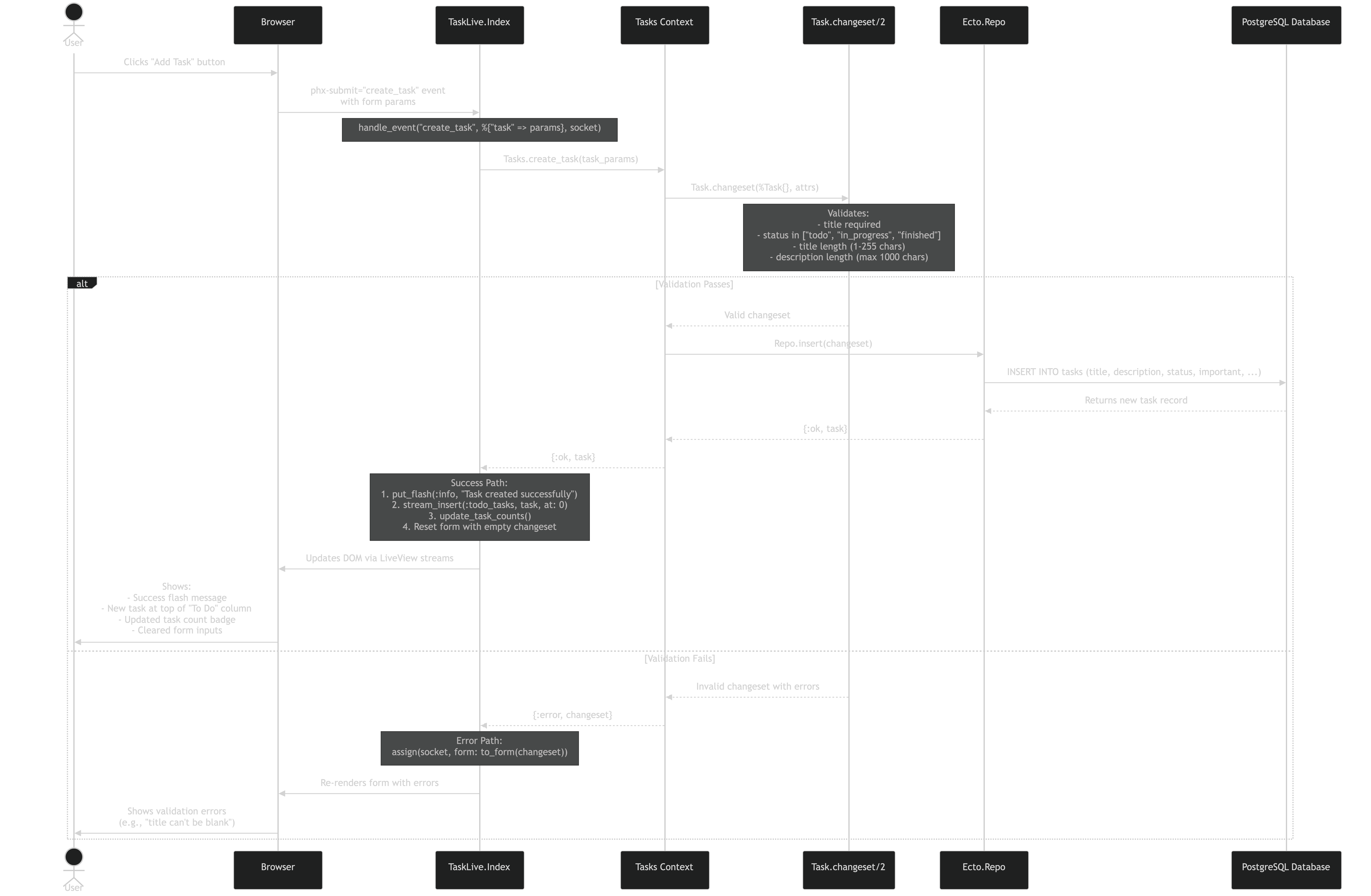
TideWave can now generate Mermaid diagrams. Ask it to visualize your code, and it produces the diagram.
That’s a Mermaid diagram showing what happens when you click “Add Task” in a Phoenix LiveView app. TideWave generated this by tracing through the actual code.
What I’m Using It For
Understanding Legacy Code: Asked TideWave to show how contexts interact in an inherited Elixir project. Got a clean diagram of data flow. Saved hours.
Here’s what I’m actually using day-to-day for Elixir/Phoenix LiveView development. Not what I tried once and forgot about.
Code Editing: Windsurf
What I use it for:
Primary IDE for Elixir/Phoenix development
In-editor AI assistance without context switching
Refactoring suggestions that understand Phoenix patterns
Why it stuck: Feels native. The AI suggestions understand Elixir idioms and Phoenix conventions. When I’m working on a LiveView component, it actually suggests LiveView-appropriate patterns, not React patterns.
I’m hacking my Rancilio Silvia espresso machine with a Raspberry Pi Zero W running Elixir/Nerves. The goal? PID temperature control for better espresso. When I decided to add a TSIC306 temperature sensor, I knew it’d be tricky, but I didn’t know how tricky.
Here’s the thing about embedded systems work: you can’t plan what you don’t understand yet. And I needed some way to stay organized without drowning in project management overhead.
When it comes to deploying Elixir applications for development, Fly.io stands out as a developer friendly platform that makes the deployment process straightforward. In this post, I’ll walk through deploying my project to Fly.io and share some key learnings along the way.
Security should be a priority from the start of any project. In the Elixir ecosystem, we have excellent tools to help catch security vulnerabilities early in development. Two essential tools are Sobelow for static security analysis and Mix Audit for dependency vulnerability checking.
Maintaining code quality is essential for any project that aims to be maintainable and scalable. In the Elixir ecosystem, Credo is the go-to static code analysis tool that helps enforce consistency and catch potential issues before they become problems.
Credo analyzes your code for readability, refactoring opportunities, software design suggestions, and common mistakes. It’s like having an experienced Elixir developer review your code automatically.
Getting started on my project I wanted to make sure I had a solid foundation in place. One of the first things I wanted to do was setup test coverage to maintain confidence in my code.
Tidewave is an AI coding assisstant meant for full stack web development. It is built on top of Elixir and Phoenix by José Valim. What I found different about Tidewave is that it runs insdie of your browser. It is deeply integrated with your web frameworkand easily allows you to see what the coding agent is doing in real time.