Elixir Phoenix Guide: Now on GitHub Copilot
The Elixir Phoenix Guide is now available for GitHub Copilot. Everything from the Claude Code version, ported into Copilot’s native instruction and hook system. Nothing was cut.
Released v2.3.0 of my Elixir Phoenix Guide plugin. This release pushes beyond core LiveView and Ecto into five additional Phoenix development domains: security, deployment, channels, telemetry, and JSON APIs. Six new hooks enforce security rules as you write, blocking dangerous patterns before they reach a commit.
Released v2.2.0 of my Elixir Phoenix Guide plugin. The big change: hooks are now context-aware. They detect your project stack at the start of a session and adjust their behavior accordingly. Four new validation hooks bring the total to 21, and every warning now includes a fix you can copy and paste.
Released v2.1.0 of my Elixir Phoenix Guide plugin. Six new skills bring the total to 14. One new hook brings it to 15. The plugin now covers the full Phoenix development lifecycle, from authentication through data patterns to deployment safety.
Released v2.0.0 of my Elixir Phoenix Guide plugin. This is a major version bump. The plugin now detects code quality issues automatically, not just through skills and hooks telling you what to do.
Released v1.4.0 of my Elixir Phoenix Guide plugin. Two new skills, three new hooks, and a fix for something that’s been bugging me: subagents ignoring the rules.
The plugin had five skills covering Elixir core, LiveView, Ecto, uploads, and testing. That’s solid for web layer code. But two big gaps remained.
No OTP guidance. GenServer, Supervisor, Task, Agent, ETS. These are core to any real Elixir application, and the plugin had nothing to say about them. Claude Code would write GenServers with blocking handle_call callbacks, skip supervision trees, or reach for Agent when a simple GenServer would do.
Released v1.3.0 of my Elixir Phoenix Guide plugin. This one is all about testing.
v1.2.0 built out four skills that cover Elixir patterns, LiveView, Ecto, and file uploads. What I didn’t have was anything for tests. You could open a _test.exs file and the plugin had nothing to say. That felt like a hole worth fixing.
The four skills worked well for production code but testing was just not covered. Claude Code would write a context module following strict patterns, then write the tests with no real guidance. The result was inconsistent test setup, missing edge cases, and assertion styles that made failures hard to read.
Released v1.2.0 of my Elixir Phoenix Guide plugin. This is a major restructuring: eight separate skills consolidated into four essential modules, each with enforced rules and real-time validation.
This isn’t a minor update. It’s a complete rethinking of how Claude Code should guide Elixir/Phoenix development.
In v1.1.x, I had eight skills covering different aspects of Elixir and Phoenix development. The structure worked, but created problems:
Released v1.1.2 of my Elixir Claude optimization plugin. The focus: making skills easier to discover and use.
In v1.0.0, Claude Code would often miss applicable skills. The “Use when” language wasn’t directive enough, and there was no systematic way to identify which skills applied to a task.
Result: Skills existed but weren’t being invoked consistently.
Added a meta-skill called skill-discovery that provides a systematic checklist based on file types and task requirements. Think of it as a flowchart for skill selection.
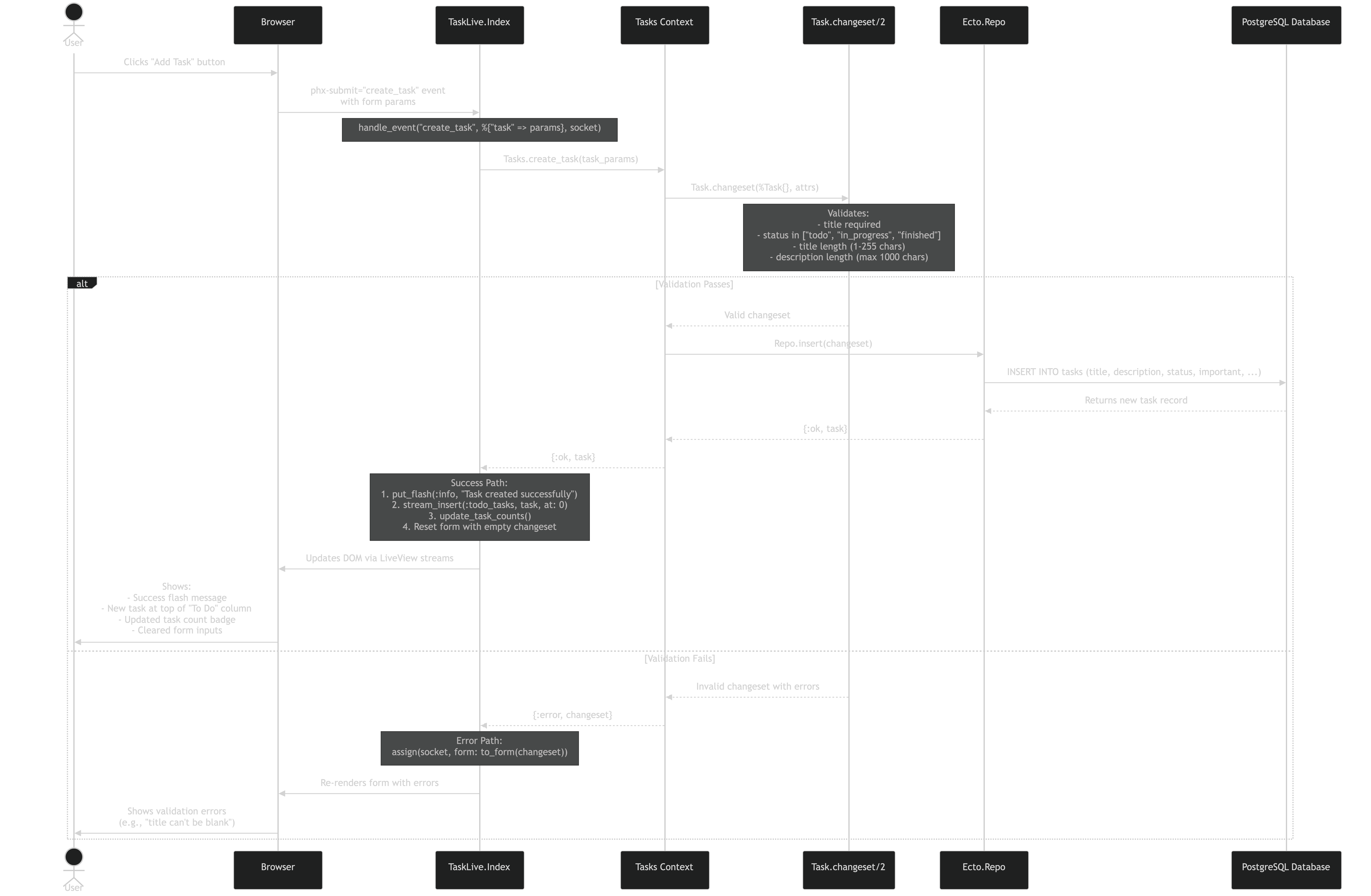
TideWave can now generate Mermaid diagrams. Ask it to visualize your code, and it produces the diagram.
That’s a Mermaid diagram showing what happens when you click “Add Task” in a Phoenix LiveView app. TideWave generated this by tracing through the actual code.
Understanding Legacy Code: Asked TideWave to show how contexts interact in an inherited Elixir project. Got a clean diagram of data flow. Saved hours.
Here’s what I’m actually using day-to-day for Elixir/Phoenix LiveView development. Not what I tried once and forgot about.
What I use it for:
Why it stuck: Feels native. The AI suggestions understand Elixir idioms and Phoenix conventions. When I’m working on a LiveView component, it actually suggests LiveView-appropriate patterns, not React patterns.